

Table of Contents
Discretionary Access Control allows users to control who can access the files, folders, and applications they own. Permissions are set directly on the resource and can be granted to other users without going through a central authority.
Access depends on how the owner assigns and manages those permissions over time. That makes DAC easy to use, but also dependent on individual decisions rather than a fixed set of rules. In this guide, we’ll cover what DAC is, how it works, and how it compares to other access control models.
What Is Discretionary Access Control?
Discretionary Access Control (DAC) is an access control model where the owner of a resource decides who can access it and what actions are allowed. Permissions are set at the resource level, such as a file, folder, or application, and can be assigned directly to other users. Each permission defines what a user can do, including reading, modifying, executing, or deleting the resource.
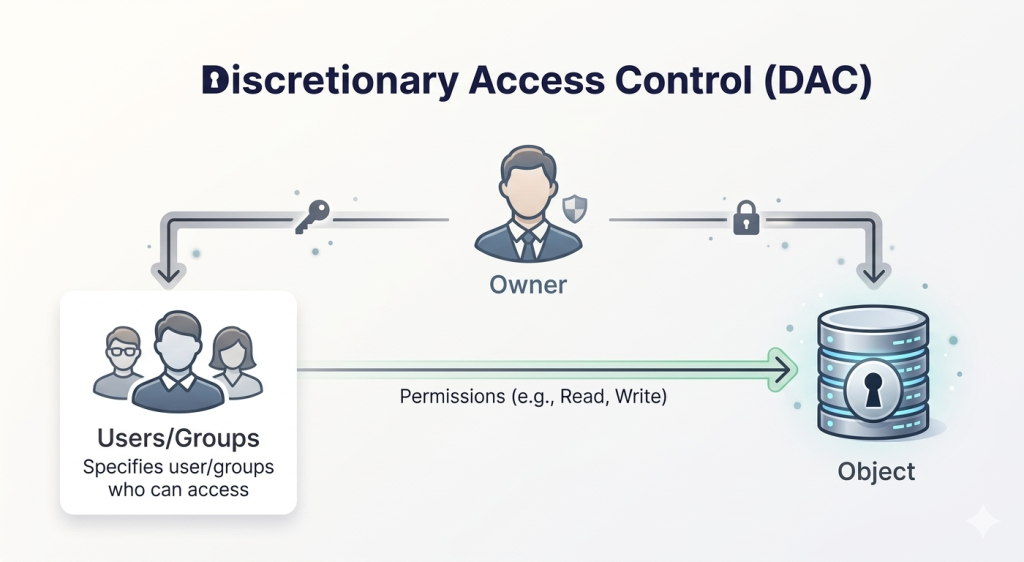
Access is based on identity and ownership, not a centrally enforced policy. The owner can grant, modify, or revoke permissions at any time. These permissions are stored in access control lists (ACLs), which the system checks before allowing access. DAC is commonly used in operating systems, file systems, and shared environments where users manage access to their own resources.
How Does Discretionary Access Control Work?
DAC links users to resources through permissions set by the resource owner. Users (subjects) request access to resources (objects). Access depends on whether the system can verify the user and match them to the permissions defined for that resource.
When a request is made, the system authenticates the user and checks the permissions associated with the resource. These permissions are stored in access control lists (ACLs), which map users or groups to allowed actions.
Some implementations use capability systems instead, where access is tied to possession of a specific reference or key rather than an ACL. In both cases, access is granted only if the required permission is present, and can be changed by the owner at any time.
Real Life Examples of Discretionary Access Control
DAC is used in many everyday tools where access is managed at the user level. Common examples include:
File Systems
Operating systems like Windows and Linux use DAC to control access to files and directories. The user who owns a file can assign permissions such as read, write, or execute to other users or groups. These permissions are enforced by the system each time access is requested.
Collaboration Tools
Tools like Google Docs or Dropbox allow users to share files with specific people. The owner controls who can view, edit, or manage the document, and those permissions can be updated at any time. Access is tied to what the owner assigns, not a central policy.
Social Networks
Facebook groups use DAC to control access to content. The group owner sets the rules for joining, viewing posts, and commenting. Access can be granted or removed directly by the owner without system-wide enforcement.
Mobile Apps
Mobile apps rely on user-controlled permissions to access features like contacts, camera, or location. The device owner decides which apps can access specific data or functions, and those permissions can be changed at any time.
Advantages of DAC
- Flexible access control: Permissions can be set per resource and per user. Owners can grant different levels of access depending on what’s needed, without being restricted by predefined roles or clearance levels.
- Quick access assignment: Access can be granted directly at the resource without building user roles or waiting on administrative changes, so access can be provided as soon as it’s needed.
- Lower administrative overhead: Access management is handled by resource owners rather than a central team. Administrators don’t need to maintain access profiles for every user across all resources.
- Simple to manage in practice: Permissions are applied directly through access control lists (ACLs), making it straightforward to assign and update access without managing complex policy structures.
Limitations of DAC
- Weaker security control: Access decisions depend on users rather than enforced policies. Permissions can be granted too broadly, increasing the risk of unauthorized access or misuse.
- Ongoing maintenance required: Resource owners are responsible for updating permissions. As users change roles or leave, outdated permissions can remain unless they are manually reviewed and removed.
- Not suited for sensitive data: DAC does not provide strict enforcement needed for highly sensitive environments. It lacks centralized control required to consistently protect critical data.
- Limited visibility: Access is managed at the resource level, making it harder to track who has access across the system and creating gaps in monitoring and oversight.
Discretionary Access Control vs Other Access Control Models
Discretionary Access Control vs Mandatory Access Control
DAC is used where access needs to be flexible and managed at the user level. MAC is used where access must follow strict rules that cannot be changed by users. The differences below show how this impacts control and enforcement.
| DAC | MAC | |
| Control | Defined by resource owner | Defined by central authority |
| Flexibility | High | Low |
| Permission changes | Owner can modify anytime | Cannot be changed by users |
| Enforcement | Based on user-defined permissions | Based on system-defined policies |
| Use case | General-purpose systems | High-security environments |
| Risk level | Higher (user-controlled) | Lower (strict enforcement) |
Discretionary Access Control vs Role-Based Access Control
DAC works at the resource level, while RBAC works at the role level. The comparison below shows how that difference affects access assignment and management across users.
| DAC | RBAC | |
| Control | Resource owner assigns access | Access based on roles |
| Permission Model | Per resource | Per role |
| Flexibility | High | Moderate |
| Management | Decentralized | Centralized |
| Scalability | Limited at scale | Scales well for large user bases |
| Consistency | Varies per resource | Consistent across roles |
When Should You Use DAC?
DAC is suited to environments where access is handled directly by users and adjusted as needs change. Some scenarios where DAC makes sense include:
- When users need to manage their own resources: DAC works well in systems where users create and control files, folders, or shared content, and need to assign access without relying on administrators.
- When strict policy enforcement is not required: DAC is more suitable in environments where flexibility is prioritized over strict control, and access does not need to follow rigid security rules.
- When access changes frequently: Permissions can be updated directly on the resource, making DAC suitable for environments where access needs shift regularly.
- When collaboration is informal or user-driven: DAC fits workflows where users share resources directly with others, without structured approval processes or predefined roles.
Frequently Asked Questions
A common example is file permissions in operating systems like Windows or Linux. The user who creates a file can assign read, write, or execute access to other users. The system enforces those permissions based on what the owner has set.
DAC can be secure in environments where access is managed carefully, but it depends on user decisions. Since users control permissions, access can be granted too broadly or left unchanged over time, which increases risk compared to centrally enforced models.
DAC allows resource owners to decide who gets access, while MAC enforces access through fixed rules defined by a central policy. In DAC, permissions can be changed by users; in MAC, they cannot.
DAC assigns permissions directly on each resource, while RBAC assigns access through predefined roles. DAC is more flexible at the resource level, whereas RBAC is more consistent and easier to manage across large numbers of users.