

Table of Contents
A lot of EHR access now happens outside the place it was originally meant for. Doctors check records after hours, billing teams work from home, IT vendors log in during system issues, and staff move between branches.
None of this is unusual anymore, but it does make it harder for healthcare organizations to decide which access attempts should be trusted in the first place. That is exactly where IP-based access control comes in.
Instead of allowing EHR logins from any connection, access can be limited to approved IP addresses. In this guide, we will explain why IP-based access control matters for EHR systems and how PureVPN for Teams can help.
According to IBM’s Cost of a Data Breach Report 2025, healthcare recorded the highest average breach cost of any industry at USD 7.42 million.
What Is IP-Based Access Control for EHR Systems?
In simple terms, IP-based access control is a way to decide who can reach an EHR system based on the IP address they are connecting from. Every internet connection has an IP address. A clinic has one, a hospital branch has one, and a vendor’s office has one.
With IP-based access control, healthcare organizations only accept access from approved or allowlisted IP addresses. For example, the EHR login can move forward when a staff member connects from the clinic, but it can be rejected if it comes from an unknown network.
The important thing to understand is while IP-based access control checks where the request comes from, it does not prove who the person is. That is why it should be used alongside MFA, SSO, role-based permissions, and audit logs, not replace them.
How IP-Based Access Control Works
IP-based access control starts with a simple list: which IP addresses should be allowed to reach the EHR system? For most healthcare organizations, that list may include the clinic, hospital branches, admin offices, approved vendor locations, or static IPs used by remote staff. Anything outside that list is treated as unknown.
The process usually looks like this:
- Choose the approved IP addresses: The organization decides which clinic, office, vendor, or static IP addresses should be allowed.
- Add them to the EHR access rules: These IPs can be added to the EHR system, firewall, identity provider, cloud access policy, or admin portal, depending on how access is managed.
- Send remote users through an approved route: Remote staff, contractors, or vendors may need to connect through a business VPN before they open the EHR login page. That way, their request comes from an IP address the system already recognizes.
- Keep the normal login checks in place: The IP check should happen before or alongside the usual login process. Users still need passwords, MFA, SSO, role-based permissions, and session monitoring.
- Review what gets allowed and blocked: IT teams can review successful logins, failed attempts, and blocked requests to spot unusual patterns, old access rules, or users trying to connect from unapproved locations
The main idea is simple: an EHR system should not accept login attempts from every internet connection by default. IP-based rules add an early access check before the user continues with the normal login process.
Common Use Cases for IP-Based Access Control in Healthcare
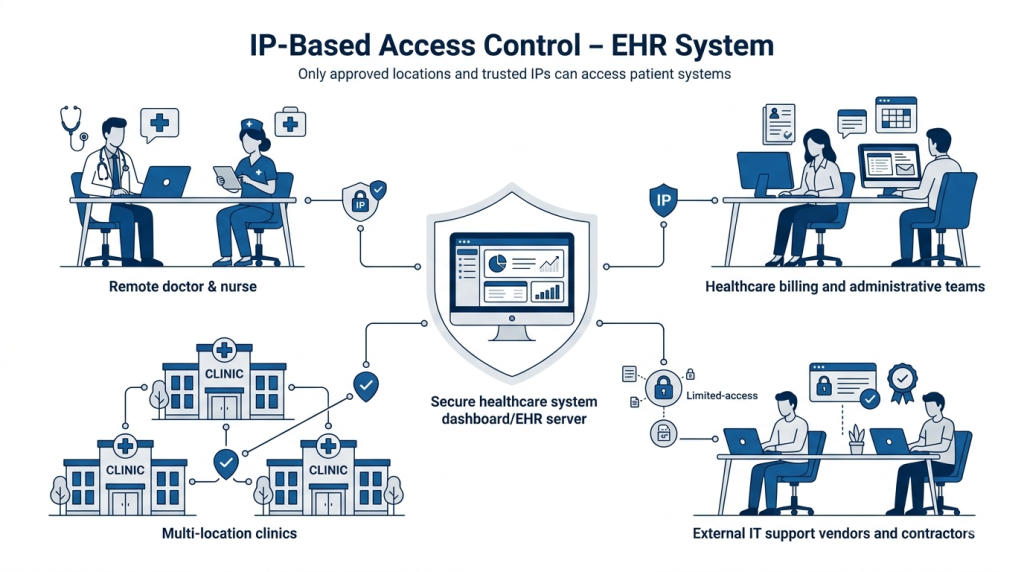
IP-based access control becomes useful when the same EHR system needs to support people working from different places. The goal is to make sure access comes from places the organization has already approved. Here are some common examples for healthcare organizations:
Remote Clinicians
Doctors, nurses, and care coordinators may need to check patient records outside the clinic, especially after hours or between locations. IP-based access control can require them to connect from an approved IP address before they reach the EHR login page.
Billing and Administrative Teams
Billing, coding, scheduling, and insurance teams often work with patient information without being part of direct care. If some of that work happens remotely, approved IP rules can keep access tied to office locations or static IPs assigned to remote staff.
Multi-Location Clinics
Healthcare groups with several branches need a way to manage access across different sites. IP-based access control lets them approve known clinic locations and treat unknown networks differently, instead of leaving access open from anywhere.
Vendors and Contractors
EHR consultants, IT support teams, and billing vendors may need limited access to the system. IP-based rules can keep that access tied to known vendor locations or approved static IPs, while permissions and logs control what they can do once they are inside.
Benefits of IP-Based Access Control for EHR Systems
IP-based access control is useful because it gives healthcare teams a clearer boundary around EHR access. That can help in a few practical ways:
- Limits access to known locations: EHR access does not stay open to every internet connection. Healthcare organizations can limit access to approved clinics, offices, vendor locations, or static IPs used by remote staff.
- Makes remote access easier to manage: Remote staff can connect through an approved route instead of using changing home, hotel, or public WiFi IP addresses. That gives IT teams a more stable way to approve and review access.
- Adds friction if credentials are stolen: A username and password may not be enough if the login attempt comes from an unapproved IP address. The request can be blocked or challenged before it reaches the usual login process.
- Keeps vendor access tighter: Contractors, IT support teams, and billing vendors may need access, but they do not need it from anywhere. IP rules can keep vendor access tied to known locations or approved static IPs.
- Makes access reviews easier: IP logs can help IT teams see where access attempts came from, which requests were blocked, and whether old access rules still make sense. That is useful when paired with identity logs and session activity.
Limitations of IP-Based Access Control
IP-based access control is useful, but it does not prove who is using the account. It only checks where the request is coming from. A login from an approved IP can still be risky if the device is compromised, the password is weak, or the user should no longer have access. Approved IP lists also need regular review.
Old vendor IPs, unused office locations, or outdated remote access routes can weaken the control over time. That is why IP-based access control should work alongside MFA, SSO, role-based permissions, audit logs, device security, and proper offboarding. It adds an early access check, but it should not replace the rest of the login and security process.
How PureVPN for Teams Can Help
With PureVPN for Teams, you can set up IP-based access control for EHR systems without hassle. Here is how:
- Provides approved IP access: Healthcare organizations can add a PureVPN for Teams static IP address to their EHR access rules, firewall, identity provider, cloud policy, or admin portal.
- Gives admins central user control: Admins can easily add users, remove users, and update access for staff members, vendors, or contractors who no longer need access to EHR systems.
- Supports stronger login control: PureVPN for Teams supports MFA and SSO integrations, including Okta, Azure AD, and Google Workspace, for teams that need identity-based controls alongside IP rules.
- Helps teams use a shared business IP: Team Server can allow multiple approved users to connect through one shared business IP, which can be useful when a healthcare team wants one known IP for a group.
Note: Clear security policies, user permissions, audit logs, and compliance processes still need to be in place to control what users can do after they connect.
Final Thoughts
EHR access now happens from different places. IP-based access control helps narrow that access to approved IP addresses, instead of leaving logins open from anywhere. For healthcare teams managing remote staff, vendors, or multiple locations, PureVPN for Teams can help keep that access easier to control.