
Table of Contents
Healthcare teams work with vendors every day, and many of those vendors need system access to do the job. An EHR vendor may need to fix a support issue, a billing partner may need access to claims workflows, and a lab, telehealth provider, or IT contractor may need access to internal data.
That access usually starts with a valid reason. However, when accounts stay active after the work is done, permissions remain wider than needed, or a vendor’s role changes while the access stays the same, it becomes an access risk that compliance and risk teams have to account for later.
Third-party vendor management in healthcare means keeping that access limited, current, and easy to review, especially when sensitive systems are involved. In this guide, we will cover where vendor access breaks down, what teams need to review, and how to keep third-party access under control.
Common Gaps in Third-Party Vendor Access
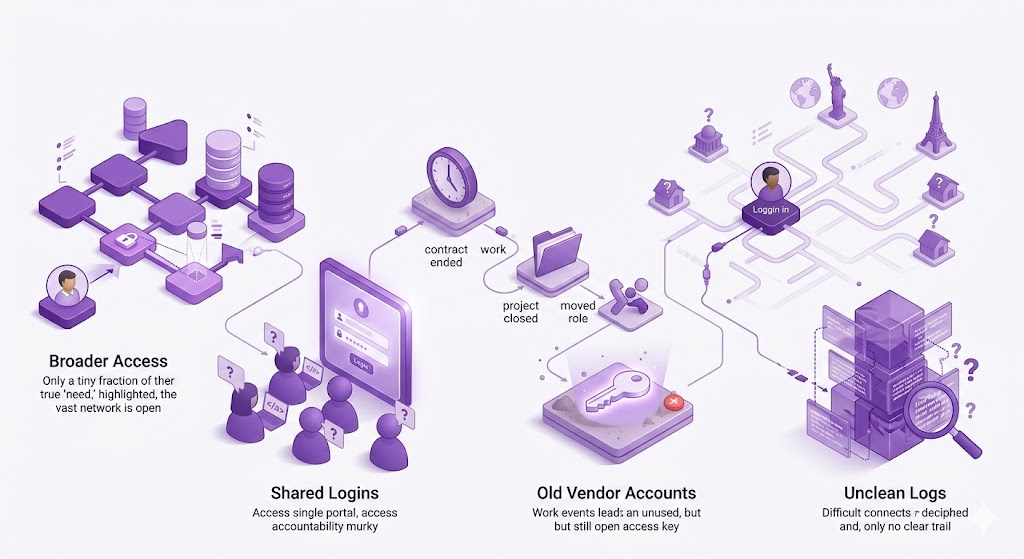
A vendor may be approved for the right reason, but the access itself can still go wrong in a few ways:
Vendors Get Broader Access Than They Need
A vendor may only need access to one workflow, portal, or support environment. However, they can still end up with wider permissions when it is faster to copy an existing role than create a limited one.
A billing partner that only needs claims access should not also reach unrelated admin areas. An EHR support vendor may need temporary access for a specific issue, not standing access across multiple environments.
Shared Vendor Logins Make Accountability Difficult
Shared vendor logins are convenient, which is why they survive for so long. One account is created for the vendor, and different people on the vendor’s side use it when needed. That weakens the activity trail.
If a setting is changed, a file is accessed, or data is exported, the healthcare organization may only see the shared account name. It may not know which person used it, whether that person was still approved, or whether the login was passed around internally.
Old Vendor Accounts Stay Active
Vendor access often stays open because the end of the work is not treated as an access event. A ticket gets closed, a project ends, or a vendor employee moves to another role, but the account remains active.
Old access is easy to miss because it does not always create noise. If the vendor no longer supports that workflow, or the person no longer works on the account, access should not remain available just because nobody submitted a removal request.
Remote Access Comes from Unknown Networks
Vendors may connect from different offices, home networks, or unmanaged locations. Without clear controls, the healthcare organization may know a vendor account was used, but not whether the connection came from an expected place.
When that account can reach sensitive tools or data, location matters. If access can come from anywhere, routine support and unusual activity become harder to separate. For high-risk access, healthcare teams may need stricter rules around where vendors can connect from.
Logs Do Not Tell a Clean Story
Most healthcare systems keep some form of access log. The harder question is whether those logs can explain vendor activity after permissions, accounts, and access paths have changed over time.
A log should show who accessed what, when, and from where. If logs only show a shared account or activity that cannot be tied back to an approved vendor need, the record creates more questions than answers.
What Compliance and Risk Teams Need to Review
For each vendor, the access review should cover a few basic details:
- Active vendor list: Keep a clear list of every third party with active access, including vendors connected to EHR environments, claims workflows, admin portals, or other sensitive areas.
- Access scope: Review the exact tools, data, workflows, and environments each vendor can reach. A vendor approved for one function should not end up with access to unrelated areas.
- Current business need: Every active vendor account should have a current reason behind it. If the reason is unclear, outdated, or tied to a completed task, the access needs a closer look.
- Internal owner: Vendor access should have someone responsible for it inside the organization. Without one, access cleanup gets missed when the vendor’s scope changes or the relationship ends.
- Current access fit: A vendor’s role can change over time. Access that made sense during onboarding may no longer fit the current contract, project, or support need, so it should be checked again.
- Reviewable activity: Teams should be able to check when a vendor connected, what they accessed, and whether the activity matched an approved need, not just that a login happened.
- Timely removal: Vendor access should not stay open because no one filed a removal request. Reviews should catch accounts tied to closed tickets, completed projects, or vendor users who no longer need access.
Vendor Access Review Mistakes to Avoid
Access reviews can still miss problems when the process is too narrow. These are the mistakes to avoid:
| Mistake | Why It Matters |
| Reviewing the vendor file only | The paperwork may be complete while live access has changed |
| Waiting until audit prep to check access | Old accounts and broad permissions are harder to clean up under time pressure |
| Not assigning an internal access owner | Cleanup gets missed when everyone assumes another team owns it |
| Treating all vendors the same | A vendor with EHR or claims access needs a tighter review than a vendor with no system access |
| Checking access without checking activity | An account may look valid until login history shows it is unused, unusual, or tied to old work |
| Reviewing access once a year only | Vendor roles, projects, and users can change long before the next annual review |
How to Reduce Third-Party Access Risk
Healthcare organizations can reduce vendor access risk by:
Keeping a Clear Vendor Access Inventory
Keep a record of every vendor with active access, including what they can access, why they need it, who approved it, and who owns the relationship internally. If a vendor supports an EHR workflow, billing process, admin portal, or internal tool, that access should be visible to compliance and risk teams too, not only procurement or IT.
Applying Least-Privilege Access
Vendors should only get the access needed for the work they are doing. A billing partner that needs claims access should not also have wider admin permissions. The same applies to EHR support. Temporary access for one support issue should not turn into standing access across multiple environments. Narrower access is easier to review and harder to misuse.
- Read: What Is PDPA?
Using Separate Vendor Accounts
Shared vendor accounts should be avoided where possible. Each vendor user should have a separate account, especially when they can reach sensitive tools or data. Separate accounts make activity easier to trace. If a setting changes or a file is accessed, the healthcare organization can see which user was involved instead of only seeing a generic vendor login.
Requiring MFA For Vendor Access
MFA should be required for vendor accounts that connect to healthcare tools, admin portals, or internal data from remote locations. A password alone is not enough for access that sits partly outside the organization’s control. While MFA does not fix broad permissions or old accounts, it reduces the chance that one exposed credential is enough to get in.
Reviewing Access On a Schedule
Vendor access should be reviewed on a set schedule, not only when an audit is close. Reviews should also happen after contract changes, project closures, vendor staff changes, or major workflow changes. A vendor may still be active, but the original permission may no longer match the current work. Scheduled reviews help catch that before access sits open for too long.
Removing Access When Work Ends
Vendor offboarding should be treated like employee offboarding. When a contract ends, a support project closes, or a vendor user leaves, access should be removed. Before a ticket, project, or vendor relationship is marked complete, teams should check whether any related accounts, permissions, or remote access paths need to be removed.
Controlling Where Vendors Can Connect From
For high-risk access to EHR systems, admin portals, or internal data, limit vendor connections to approved IP addresses. Healthcare teams can then separate expected vendor access from logins that need a closer look. PureVPN for Teams can help by giving approved vendors a dedicated IP that healthcare teams can add to their allowlist.
Maintaining Usable Vendor Access Logs
Logs should show who connected, what they accessed, when they connected, and where the connection came from. They should also connect back to the approved access need. If vendor activity does not match the current project, support request, or business purpose, the review should catch it.
Frequently Asked Questions
Vendor access becomes a risk when accounts stay active too long, permissions are broader than needed, or activity cannot be traced to a specific person. In healthcare, that risk is higher because vendors may connect to EHR systems, claims workflows, admin portals, or internal data.
Vendor access should be reviewed on a set schedule, but also after contract changes, project closures, vendor staff changes, or support work ending. Waiting for audit prep can leave old accounts, broad permissions, or unused access in place for too long.
A vendor access review should check the active vendor list, access scope, current business need, internal owner, login activity, and removal status. The review should confirm that each vendor still needs the access they have and that the activity matches the approved purpose.
Healthcare organizations can control vendor remote access by requiring MFA, using separate vendor accounts, reviewing logs, and limiting high-risk access to approved IP addresses. A dedicated IP can help teams allowlist approved vendor connections.