
Table of Contents
Cloud-based financial applications rely on infrastructure that different users and services may need to reach for legitimate operational reasons. Engineers may need production access, deployment systems may need to push changes, services need to communicate with databases or APIs, and third parties may require access to specific resources.
The challenge is making sure that each user or service has only the access it actually requires. Authentication verifies the identity requesting access, but it does not decide which systems should be reachable, how much privilege that identity should have, or how that activity is recorded.
Infrastructure access control defines who and what can reach cloud resources, and what they can do once connected. In this guide, we will look at where access becomes too permissive in fintech environments and how teams can structure controls across users, workloads, and cloud infrastructure.
What Infrastructure Access Control Covers in Fintech Cloud Environments
Infrastructure access extends beyond the application itself. It includes the cloud accounts, production workloads, databases, internal services, deployment systems, and administrative tools that keep the application running.
| Access type | Examples |
| Human access | Engineers, administrators, security teams, contractors, and vendors |
| Workload and service access | Applications, service accounts, APIs, deployment pipelines, containers, and other workloads |
Cloud access also happens without a person signing in, so infrastructure access control has to account for both human users and machine identities. Access can become too broad in different ways for each, which brings us to the next section.
Where Cloud Infrastructure Access Commonly Breaks Down
For both human users and machine identities, access can get out of hand in a few common ways:
- Temporary access turns into standing access: Elevated access granted for incidents, maintenance, migrations, troubleshooting, or short-term vendor work can remain active after the task ends.
- Service accounts accumulate permissions: As applications change, service accounts may pick up additional permissions or access to systems that are no longer required for their current function.
- Production access becomes too broad: Permissions can expand as responsibilities change, engineers move between projects, or administrative roles are reused. Someone may still have production access they no longer need.
- Sensitive resources remain publicly reachable: A customer-facing application may need public connectivity, but databases, administrative interfaces, management services, and internal tools often do not need the same exposure.
- Different environments develop different access rules: Production, staging, development, disaster recovery, and separate cloud accounts can evolve under different policies, leaving similar resources with inconsistent levels of access or exposure.
- Third-party access extends beyond the original need: Vendor access can remain active too long or reach more infrastructure than required. Shared vendor accounts or credentials can also make activity harder to trace to a specific person.
How to Control Access Across Cloud Infrastructure
Controlling access across cloud infrastructure requires several safeguards to work together, including:
Verifying the Identity Requesting Access
Start with a known identity, whether the request comes from a person or a workload. Cloud IAM can assign permissions to users, roles, service accounts, and other machine identities, while MFA adds another check for sensitive or privileged access.
Where SSO is used, employee access can also be managed through the organization’s identity provider. Shared accounts make individual activity harder to distinguish, so administrative access is better tied to identifiable users wherever possible.
Controlling Which Infrastructure Can Be Reached
A valid identity does not need a network route to every resource in the environment. Databases, management interfaces, internal services, and other sensitive systems can remain on private networks when public connectivity is not required.
VPC or VNet boundaries, network segmentation, security groups, firewall rules, and limits on administrative ports can narrow those routes. Remote infrastructure teams can also use an approved business VPN, while a static IP can support source-IP restrictions.
Defining What Authorized Users Can Do
Reaching a resource and having permission to change it are different things. An engineer may need access to a production environment without needing administrative rights across every system inside it.
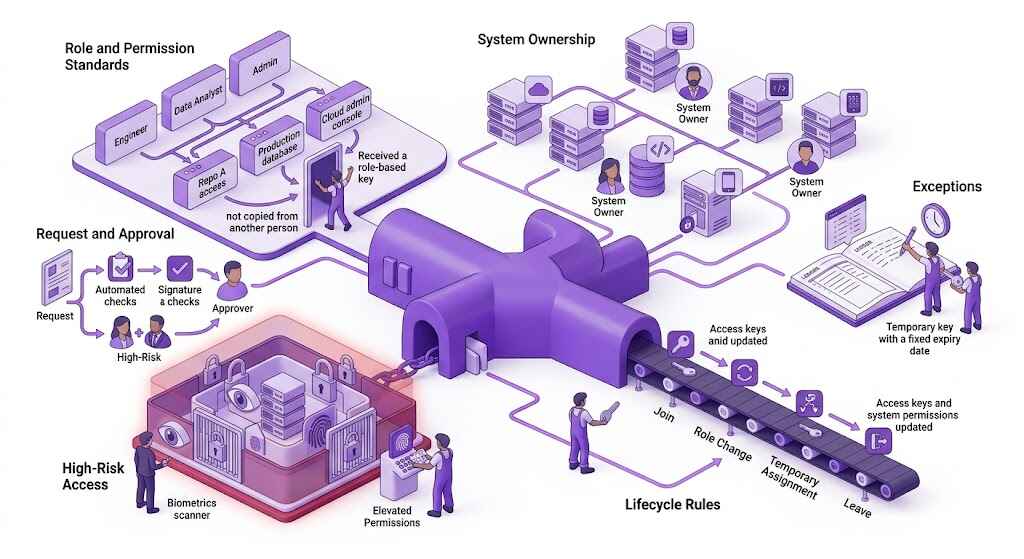
Least-privilege roles can separate read, write, deployment, and administrative permissions according to the task. Elevated production access can also be granted only when required instead of remaining available by default.
Restricting Service-to-Service Access
The same limits apply to workloads. Applications, APIs, deployment systems, and background services can use service identities and permissions that match the systems they need to communicate with.
A transaction service that needs one database and one internal API, for example, does not also need access to unrelated storage or administrative tools. API credentials, tokens, and other secrets should stay tied to the services that require them rather than being broadly shared.
Keeping Sensitive Access Temporary Where Possible
Elevated access may be needed temporarily for incident response, maintenance, troubleshooting, production changes, or vendor support. Time-limited privileges help keep that exception tied to the task.
Where the platform supports it, teams can also use approval workflows or automatic expiry so elevated access does not remain active after the work is complete. Automatic expiry also reduces the need to rely on someone remembering to revoke temporary access later.
Making Infrastructure Access Traceable
Teams also need a record of access to sensitive infrastructure. Relevant identity and cloud audit logs can cover authentication events, failed access attempts, permission changes, administrative activity, service-account activity, and changes to network rules.
Periodic access reviews can then surface dormant accounts, unused permissions, old vendor access, persistent elevated privileges, and service identities that no longer have an operational purpose, so teams can remove or tighten access before it becomes an unnecessary risk.
Frequently Asked Questions
Infrastructure access control determines who or what can reach cloud resources and what they are allowed to do once access is granted. It usually combines identity controls, network restrictions, permissions, and logging so access stays limited to the systems and actions required.
Yes, a business VPN can help control remote access by giving teams an approved encrypted connection and, where a static IP is used, a consistent source IP for allowlisting. It still needs to work alongside IAM, firewall rules, and other network and permission controls.
Least privilege gives users, services, and workloads only the permissions required for their current tasks. Administrative or elevated access can be restricted to specific systems and granted temporarily when broader permissions are actually needed.
IAM controls identity and permissions, including who can sign in and what actions they can perform. Network access control limits which systems or services can be reached in the first place through measures such as private networks, security groups, firewall rules, and source-IP restrictions.