
Table of Contents
MSPs rely on technicians and engineers to access customer systems as part of day-to-day service delivery. Depending on the work involved, that access can extend to servers, networks, cloud platforms, and administrative accounts across multiple customer environments.
The challenge is making sure that access stays appropriate as technicians change roles, take on different customers, or no longer need the same permissions. MSPs also need to know who has access, how they authenticate, and whether the controls in place can be demonstrated when their security practices are assessed.
Access control can also factor into cyber insurance assessments and SOC 2-related assurance work, although the requirements are not the same. In this guide, we will look at how MSPs can manage access to customer environments and what they may need to demonstrate during a security assessment.
Why MSP Access Comes Under Scrutiny During Security Assessments
Several aspects of day-to-day service delivery can make technician access particularly relevant during an assessment:
Staff Can Hold Significant Access to Customer Systems
Technicians and engineers may need elevated permissions to manage infrastructure, configure systems, troubleshoot issues, or perform other work for a customer. The level of access can differ depending on the service being provided and the technician’s responsibilities.
Some technicians can have permissions that reach sensitive or administrative areas of customer systems. Controlling who receives elevated access and what they can reach becomes an important part of the security controls being assessed.
Access Changes as Service Delivery Changes
A technician’s access needs do not necessarily stay the same. They can shift as the technician moves between customers, takes on different support responsibilities, or works on new projects over the course of their role.
Permissions that were appropriate for one assignment may no longer match the technician’s current work. Across multiple customers, the people who need access and the permissions they require can keep shifting as service responsibilities evolve.
Requirements Differ Across Customer Environments
MSPs can manage their own personnel and internal access practices, but service delivery often requires technicians to work within systems controlled by their customers. Each customer can have its own requirements for authentication, permissions, remote access, etc.
An MSP may be working across customers with different rules for how its technicians authenticate, connect, and receive permissions. Managing access in that situation involves both the MSP’s own practices and the requirements set for each customer environment.
What Access Controls Need to Cover in MSP Service Delivery
Managing technician access requires several controls to work together:
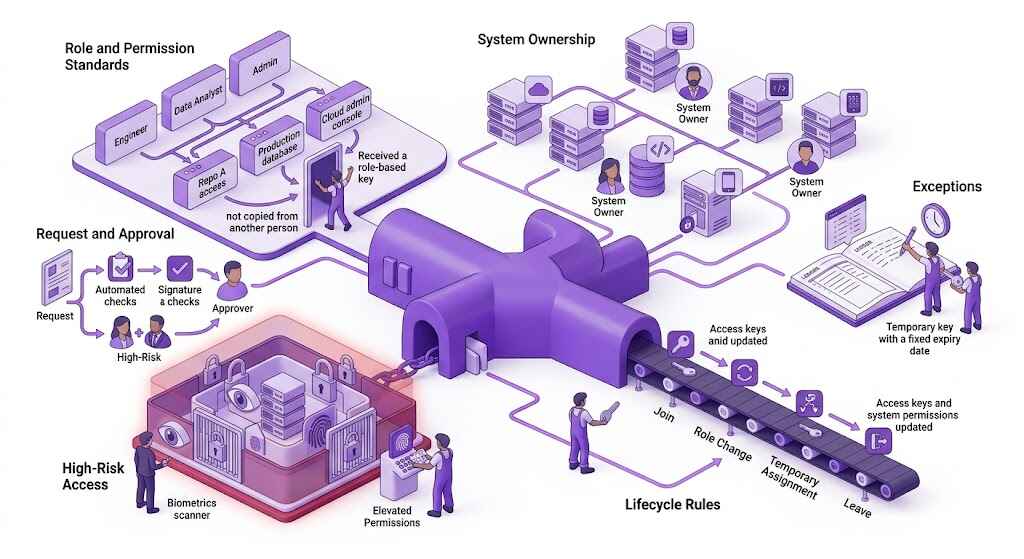
Individual User Accounts
Technicians should have individual accounts when accessing customer systems rather than sharing credentials with other members of the service team. Shared accounts make it harder to attribute activity to a particular person and determine who had access at a given time.
Accounts also need clear ownership. If several technicians work with the same customer, each person’s access should remain identifiable rather than being grouped under a common technician or administrator account.
Least-Privilege Access
Technicians should receive the systems and permissions required for the work assigned to them. Working for the MSP does not, by itself, mean someone needs broad access across every customer or every part of a customer’s environment.
Permissions also need to match the work involved. A technician handling a limited support task, for example, does not need administrative privileges simply because other members of the service team use them.
Related Read: Implementing the Principle of Least Privilege
Strong Authentication
Technician accounts need authentication controls appropriate to the systems being accessed. MFA can provide an additional layer of protection, while customer-supported identity controls such as SSO can help MSPs follow the authentication policies already used in that environment.
Requirements will not always be identical across customers. Technicians need to use the authentication methods required for each environment rather than relying on a single approach across every account they use.
Privileged Access
Administrative and other elevated accounts need tighter control because they allow technicians to make changes or reach resources that standard accounts cannot. Privileged access should be limited to technicians whose responsibilities require it and to the environments where that access is needed.
Where privileged access management (PAM) is used, it can help control privileged credentials and how elevated access is granted and used. The exact approach will depend on the systems involved and the customer’s own requirements.
Access Changes and Revocation
Permissions need to be updated when a technician changes responsibilities, moves to another customer, or finishes a project. Access that is no longer required should be removed rather than left active unnecessarily.
The same applies when someone leaves the MSP. Customer accounts, administrative permissions, and other access associated with that person need to be included in the offboarding process.
Periodic Access Reviews
Not every unnecessary permission will be tied to an obvious role or staffing change. Periodic reviews give MSPs a way to compare existing accounts and permissions with the work technicians currently perform.
A review can identify accounts that are still active after the original need has passed, permissions that no longer match a technician’s responsibilities, or access to customers they no longer support. It also gives the MSP a chance to remove access that was not caught through a known role or assignment change.
Secure Remote Connections
Technicians working remotely need to use the connection methods required by the customer whose systems they are accessing. Those requirements might include a customer-provided remote access service, restrictions on where connections originate, or other network controls.
A business VPN can also be used when technicians need to connect remotely to customer systems. If a customer only allows connections from approved IP addresses, a dedicated IP can give the technician a consistent IP to connect from.
The Role of Access Control in Cyber Insurance and SOC 2 Assessments
Access controls can come into focus when an MSP applies for or renews cyber insurance. Insurers may ask how remote and administrative access is protected, including whether MFA is used and what controls are in place around privileged accounts.
The questions will vary by insurer, policy, and application. MSPs need to answer based on the controls they actually have in place and where those controls apply. If MFA is only used for certain accounts or customer environments, for example, the response needs to reflect that.
SOC 2 looks at access control from a different angle. Under the Security criteria, the Trust Services Criteria cover logical access, including how users are authorized and authenticated and how access is restricted based on their roles and responsibilities.
The controls will depend on the system and scope of the examination rather than a single access control checklist. A SOC 2 examination considers how those controls are designed, while a Type 2 examination also looks at how they operated over a specified period.
What MSPs Need to Show During a Security Assessment
Depending on the assessment, MSPs may need records showing how technician access is managed, such as:
- User and access records: Current accounts and permissions showing who has access to the systems covered by the assessment.
- Access approvals and changes: Records showing when access was granted or changed and who approved it.
- Authentication records: Evidence that the authentication controls being assessed, such as MFA, are enabled for the relevant accounts or systems.
- Access review records: Results from periodic reviews showing which accounts and permissions were checked and any changes that followed.
- Revocation and offboarding records: Records showing that access was removed when technicians changed responsibilities, stopped working with a customer, or left the MSP.
- Privileged access records: Where relevant, records showing who has elevated access and how that access is managed.
- Policies and procedures: Documentation covering the access control processes included within the assessment.
Frequently Asked Questions
There is no single review frequency that applies to every MSP or customer environment. Reviews need to account for the type of access technicians have, the systems they work with, and any requirements set by the customer or assessment. Access also needs to be checked when a technician changes roles or stops working with a customer.
The records requested will vary with the assessment. They can include current user and permission records, access approvals, authentication records, access review results, offboarding or revocation records, and records for privileged access. MSPs may also need to provide the policies or procedures behind the access controls being assessed.
Privileged access should be limited to technicians who need it for their work. Administrative accounts should be tied to individual users where possible, and technicians should only have elevated permissions for the systems they need to manage. MSPs can also use privileged access management or just-in-time access when those controls fit the environment.
An access review should check who has access to each customer environment and whether their permissions still match their current responsibilities. MSPs can also check privileged and inactive accounts, authentication controls, and access held by technicians who have moved to another role or customer.