

Table of Contents
Software development organizations rarely lose control of access all at once. It happens permission by permission: a developer keeps production rights after changing teams, a contractor account outlives the engagement, or a service credential has no clear owner.
Across cloud consoles, repositories, CI/CD pipelines, databases, and internal tools, those gaps accumulate until nobody can reliably answer four basic questions: who has access, to what, why, and for how long.
This is where access control governance becomes necessary. It gives engineering directors and security leads a way to apply consistent rules across systems without turning routine engineering work into an approval queue.
In this guide, we break down what rules and responsibilities access control governance must establish, how organizations can assess whether those controls are working, and the steps involved in introducing them across engineering teams.
Access Control Governance: A Quick Refresher
Access control governance stops access decisions from being made tool by tool and team by team. It sets common rules for who can receive access, who can approve it, how long it should remain active, and when it must be reviewed or removed.
The controls may sit inside IAM platforms, cloud roles, repository permissions, or network policies. Governance keeps those decisions consistent and makes responsibility clear, so the organization can trace why access exists and correct gaps when they appear.
Why Informal Access Management Creates Risk
As access spreads across more teams and systems, informal decisions leave gaps that become harder to see and control.
Access Decisions Happen Outside a Defined Process
A developer may ask for repository or cloud access through Slack, email, or a call with an administrator. The request gets handled quickly, but the reason, approval, and intended duration may never be recorded.
The organization is then left with no reliable history when someone later asks why the access exists. Similar requests also depend on who receives them rather than a consistent standard, which can lead to uneven access decisions across teams.
Permissions Accumulate as Roles and Projects Change
Access often reflects what someone needed in the past, not what their current role requires. A developer may keep production rights after moving to another team, while temporary permissions granted during an incident can remain active months later.
Contractor access creates the same problem when accounts have no expiry date or named sponsor responsible for closing them. Each permission may have made sense when granted, but the combined access can grow far beyond the person’s current responsibilities.
Different Teams Apply Different Standards
Two engineering teams may handle the same request in completely different ways. One may require approval from a manager and system owner for production access, while another grants it based on a message from a team lead.
Permissions may also be copied from an existing employee because that is faster than defining what the new role actually needs. Over time, access reflects team habits and individual judgment rather than the sensitivity of the system.
Non-Human Access Can Fall Outside Normal Oversight
Service accounts and CI/CD identities, along with the API keys and tokens they use, often fall outside employee access processes. Some lack a named owner, while others keep broad permissions because changing them could disrupt an application or deployment pipeline.
CyberArk’s 2025 survey reported 82 machine identities for every human identity in organizations, with 42% holding sensitive or privileged access. Without the same oversight applied to human accounts, these identities can be difficult to trace, review, or retire.
What the Access Governance Framework Must Decide
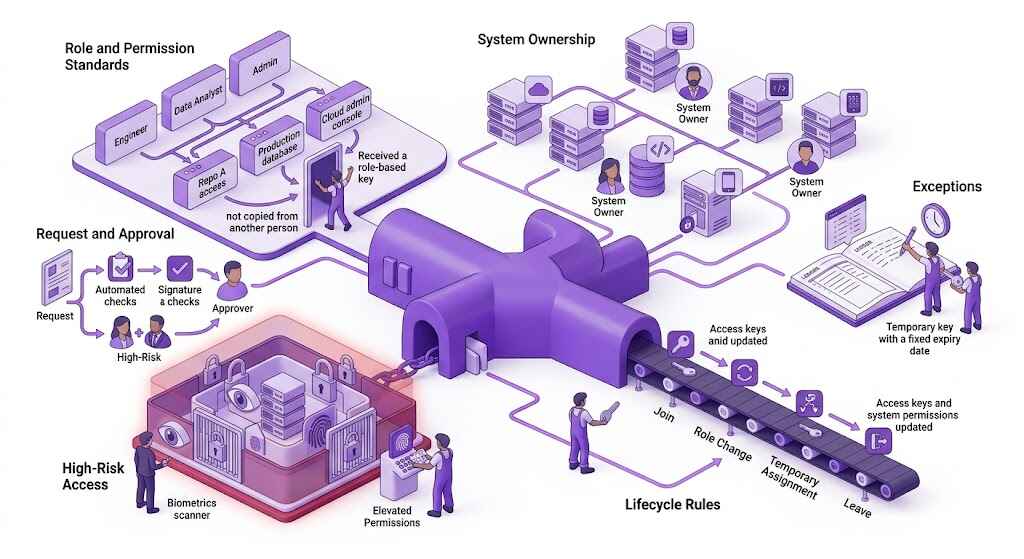
An access governance framework has to settle the questions that informal processes leave open. Teams need clear rules for what is covered, who makes each decision, and how access should change over time.
- Scope and system ownership: Define which systems, environments, identities, and credentials are covered, then assign an accountable owner to each system.
- Role and permission standards: Set access according to job responsibilities, permission level, and environment rather than copying access from another employee.
- Request and approval rules: State what each request must include, who can approve it, and which types of access require additional approval.
- Lifecycle rules: Decide how permissions are granted, changed, expired, and removed when people join, move teams, take temporary assignments, or leave.
- High-risk access: Apply tighter controls to production systems, cloud administration, customer data, secrets, and service accounts with elevated permissions.
- Exceptions: Record why an exception is needed, who approved it, what conditions apply, and when the access must expire.
How to Check Access Governance Is Working
A framework can look complete on paper and still fail once access drifts away from approved roles and responsibilities. The organization needs a regular way to compare current access with what each person or system should still be allowed to reach.
Review Access Against Current Responsibilities
Access reviews should check whether permissions still match the person’s role, team, and active work. Permissions involving production systems, cloud administration, customer data, or privileged accounts may need closer review than routine development access.
The review should also flag inactive accounts, expired contractors, temporary access that remained open, privileged permissions without current approval, unowned service accounts or credentials, and exceptions that have passed their end date.
Use Records to Verify Access Decisions
Reviewers need enough evidence to understand why access exists and how it has been used. That may include request and approval records, access-removal records, identity logs, cloud audit trails, repository activity, application logs, and changes to roles or group membership.
For access to company systems through a VPN, user-level activity reporting (available with PureVPN for Teams) can show when a user connected and which gateway they used. It adds context but does not replace logs from the systems reached through that connection.
Assign and Track Corrective Action
Finding a gap is only useful if someone is responsible for closing it. Each issue should have an owner, a required action, and a deadline, whether that means removing access, reducing permissions, assigning ownership, or renewing a justified exception.
Engineering, security, IT, and system owners should also track recurring findings. Repeated problems in the same team or system usually point to a weakness in the process rather than a series of unrelated mistakes.
How to Introduce the Framework Across the Organization
Trying to apply access governance across every team and system at once can create delays before the process has been tested. A phased rollout gives the organization room to find problems without disrupting engineering work across the board.
- Start with the highest-risk systems: Prioritize production environments, cloud administration, source code, customer data, secrets, and other areas where weak access controls could cause the most damage.
- Choose a limited first rollout: Apply the framework to one team, environment, or access workflow before extending it across the organization.
- Assign clear rollout responsibilities: Decide who will coordinate the rollout, make technical changes, answer questions, and resolve blockers between teams.
- Test the process with real cases: Use onboarding, team transfers, temporary access, contractor access, and offboarding to find delays, unclear handoffs, or steps people may bypass.
- Fix problems before expanding: Address approval bottlenecks, ownership gaps, and permissions that are difficult to change or remove.
- Expand according to risk: Move to the next systems and teams based on potential impact, using what the first rollout revealed to improve the process.
Frequently Asked Questions
Access control is the technical mechanism that allows or blocks access to a system or resource. Access governance sets the rules for how those controls should be assigned, approved, reviewed, and removed across the organization.
IAM provides the tools used to manage identities, authentication, roles, and permissions. Access governance defines how the organization uses those tools, who is accountable for decisions, and how access is checked over time.
Ownership is usually shared across security, IT, engineering, and individual system owners. One team should coordinate the framework, while system owners remain responsible for deciding what access is appropriate within their platforms.
The frequency should reflect the risk of the system and permission level. Production, cloud administration, customer data, and privileged access may need more frequent review than routine development tools.
Yes. Service accounts, CI/CD identities, API keys, and tokens can hold broad or privileged permissions. Reviews should confirm that each still has a valid purpose, a named owner, and only the access it requires.