Got questions? Let’s jump on a call
Feel free to reach out for any cyber security help you might need!
 Trusted by 5,000+ teams
|
|
|
|














Add seats. MonthlyAnnual |
MembersInvite up to 1000 team members into your plan, ensuring secure remote access while safeguarding your team's devices.$7 /user/moUh-Oh! you can only add up to 1000 members.  Choose tier |
Static IPsAssign dedicated IPs for each team member, providing enhanced security and private internet access to your online resources.$ 5.99 $ 3.99/mo/IP Port ForwardingUse Port Forwarding to access your PC, server, or any service from anywhere. Enable gaming, website sharing, or router-specific connections.$ $ 1.99/mo/IP Team's ServerAssign a single IP address for your entire team to streamline connections and enhance security when accessing shared resources.Add $ $ 50/mo/IP |
Total
Country Tax:
Austria
 Free admin dashboard to manage usersSecure remote access to internal resourcesAES-256 encryption and modern VPN protocols.Always-on 24/7 live chat support Modern network security solutionZTNA and compliance security on the goNext-gen Password manager for teamsSmart dark web threat intelligence and scanner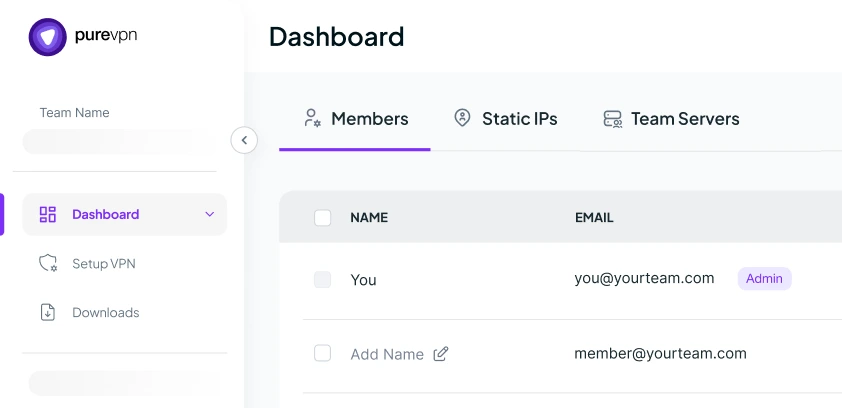

We've received your request. A member of our team will connect with you shortly to walk through how we protect and scale business networks like yours.
Feel free to reach out for any cyber security help you might need!
“PureVPN sets an example of what customer support should be like. PureVPN has great features and an easy-to-navigate portal. It’s clear that a lot of thought was put into the UI, which I believe is an often undervalued feature of systems in general.”

HelloRache

“PureVPN sets an example of what customer support should be like. PureVPN has great features and an easy-to-navigate portal. It’s clear that a lot of thought was put into the UI, which I believe is an often undervalued feature of systems in general.”
HelloRache
“PureVPN sets an example of what customer support should be like. PureVPN has great features and an easy-to-navigate portal. It’s clear that a lot of thought was put into the UI, which I believe is an often undervalued feature of systems in general.”
HelloRache
“PureVPN sets an example of what customer support should be like. PureVPN has great features and an easy-to-navigate portal. It’s clear that a lot of thought was put into the UI, which I believe is an often undervalued feature of systems in general.”
HelloRache
“PureVPN sets an example of what customer support should be like. PureVPN has great features and an easy-to-navigate portal. It’s clear that a lot of thought was put into the UI, which I believe is an often undervalued feature of systems in general.”
HelloRache

|
Proton VPN | ExpressVPN | Surfshark | ||||||||||||
|---|---|---|---|---|---|---|---|---|---|---|---|---|---|---|---|
| VPN Protocols |
|
WireGuard, OpenVPN | Lightway, OpenVPN, IKEv2 | WireGuard, OpenVPN, IKEv2 | |||||||||||
| Control Panel for VPN Access |

|
|
|
||||||||||||
| Server IP for Whole Team |
|
|

|
||||||||||||
| Static IP for Single User |
|
|
|
||||||||||||
| User-Level Activity Reporting |
|
|
|
||||||||||||
| On-demand VPN |
|
|
|
||||||||||||
| Port Forwarding |
|
|
|
||||||||||||
| Secure WiFi |
|
|
|
||||||||||||
| Password Manager | Paid |
|
|
||||||||||||
| MFA and SSO | only SSO |
|
|
||||||||||||
| Annual Price (for min. 10 seats) |
$7
/user per month
|
$5
/user per month
|
$7
/user per month
|
Read on to frequently asked questions about PureVPN teams


A business VPN for teams creates an encrypted tunnel between your employees’ devices and company resources, preventing the most common cyber attacks remote workers face. When your team connects to public WiFi, hackers can execute man-in-the-middle attacks to intercept data, perform packet sniffing to steal passwords, or use ARP spoofing to redirect traffic. The VPN establishes a secure tunnel using protocols like OpenVPN or IKEv2, wrapping every data packet in multiple layers of encryption and authentication with military-grade AES-256 encryption.
Unlike consumer VPNs designed for anonymous browsing, business VPNs provide centralized control and accountability. You manage all team access from one dashboard, assign static IP addresses, authenticate devices, and form a secure layer of access to internal systems. PureVPN for Teams implements this by providing each team member with dedicated static IPs you can whitelist in your applications – meaning even stolen credentials are useless without the correct VPN connection.
PureVPN for Teams extends beyond basic VPN tunneling to include password management, dark web monitoring, application control, and MFA/SSO, transforming network security from a complex technical challenge into a simple business process at an affordable cost. This comprehensive approach means you’re not just getting encrypted connections, but a complete security ecosystem that protects against modern threats.
One of the major reasons why teams started to use PureVPN for Teams is secure remote access in today’s evolving cyber threat environment. Remote employees connecting from home networks, co-working spaces, and public WiFi face sophisticated cyber threats that traditional security measures cannot adequately address. Network sniffing tools can capture credentials within seconds, rogue access points hijack active sessions, and compromised home routers expose entire corporate networks. Research indicates that 68% of data breaches involve remote access vulnerabilities, with average breach costs exceeding $4.35 million globally.
PureVPN for Teams addresses these vulnerabilities through comprehensive security architecture. Beyond military-grade AES-256 encryption, the platform provides dedicated static IP addresses that enable zero-trust access control. Organizations whitelist these specific IPs in their cloud services and applications, ensuring that compromised credentials alone cannot grant unauthorized access. The integrated password manager eliminates the credential reuse responsible for 81% of breaches, while continuous dark web monitoring alerts administrators within hours if company data appears on criminal forums. The Pro plan extends zero-trust capabilities with device posture checks that verify endpoint security before granting access, customizable security policies that enforce VPN usage requirements across teams, and application control settings that administrators configure to manage how PureVPN operates on user devices. These ZTNA features work together with MFA/SSO integration and SCIM provisioning to create multiple verification layers – ensuring that only authorized users on compliant devices can access company resources.
The fundamental difference between business VPN and Zero-Trust Network Access (ZTNA) lies in their authentication and trust models. Traditional business VPNs operate on perimeter-based security – once users authenticate, they gain broad network access similar to being inside a corporate office. This “”trust once, access many”” approach worked when resources resided within defined network boundaries but creates vulnerabilities in cloud-distributed environments.
ZTNA eliminates implicit trust, verifying every access request regardless of user location or previous authentication. Each application connection requires separate verification, with no inherent trust between resources. PureVPN for Teams intelligently combines both methodologies – maintaining VPN’s compatibility with all application types while enforcing ZTNA’s security framework. The platform implements zero-trust principles through dedicated static IPs that create identity-based access boundaries, MFA/SSO integration for persistent identity verification, device posture checks that validate endpoint security before connection, and customizable security policies.
No IT experience is necessary because PureVPN for Teams eliminates the technical complexity inherent in traditional VPN management. We replace command-line configurations, network topology planning, and certificate management with an intuitive web dashboard. Setup involves three straightforward steps: create account, add team member emails, and send invitations. Even advanced features maintain this simplicity: SSO configuration uses familiar OAuth flows, MFA activation requires only checkbox selection, and SCIM provisioning includes step-by-step guide. After all this, PureVPN for teams comes with an always-on 24/7 expert support for resolving any hiccups your team faces.
Yes, PureVPN for Teams enables individual static IP assignment for each team member, providing persistent digital identities essential for modern access control. Unlike dynamic IPs that change per session, static IPs remain constant across all connections regardless of where employees work. You can simply configure the static IP of your desired location and assign it to any team member with just 2 steps, enabling secure yet consistent connection.
Yes, with Team server of PureVPN, you can assign one static IP across your entire team, making it incredibly simple to manage access for small to medium businesses. This means all your employees – whether 5 or 50 – connect through the same IP address, just like they would if working from the same office.
Yes, PureVPN for Teams includes both MFA and SSO, making login safer without being complicated for your teams.
SCIM provisioning is an automatic syncing system that connects your employee directory (like Google Workspace or Microsoft 365) with PureVPN for Teams, keeping them perfectly matched at all times. When someone’s added or removed from your organization, SCIM updates or removes their app access instantly.
PureVPN for Teams secures remote employees by encrypting their entire internet connection before any data leaves their device, making home WiFi security irrelevant. When employees work from home, they face three main threats: unsafe home networks, ISP monitoring, and neighborhood hackers. PureVPN not only eliminates all three by creating a secure tunnel that starts at the employee’s laptop and ends at your company resources, but also adds multiple security layers for complete protection. Device posture checks verify that employee devices are secure and updated before allowing connections, blocking access from compromised machines. MFA requires employees to verify their identity through their phone even if passwords are stolen, while SSO ensures they use strong corporate credentials instead of weak personal passwords.
Yes, PureVPN for Teams provides enterprise-grade protection for cloud platform access through static IP whitelisting – the most effective security method for AWS, Azure, and Google Cloud. Here’s how it works: assign static IPs to your team through PureVPN, then configure your cloud platforms to only accept connections from these specific IPs. You can assign different IPs for different access levels – developers get IPs whitelisted for development environments, while only senior engineers’ IPs can access production.
Healthcare startups use PureVPN for Teams to create HIPAA-compliant access controls for Protected Health Information (PHI) through multiple security layers. The platform encrypts all data transmission with AES-256 encryption, meeting HIPAA’s encryption requirements for data in transit. Static IP assignments create access controls showing exactly who accessed patient records and when – critical for HIPAA audit logs.
Additonal features like MFA, SSO, and device posture check add an strong layer of user authentication and access control.
PureVPN for Teams secures production and testing environments through IP-based access segregation that prevents human errors. Assign your senior developers static IPs that are whitelisted only in production systems, while junior developers get different IPs that can only access testing environments. This creates an unbreakable barrier – even if a junior developer accidentally pushes code to production, the connection gets blocked at the IP level. Moreover, In Pro plan, you can create multiple teams which allows to create sugements like “Production Team” and “Development Team” with different security policies, MFA requirements, and access windows.
While PureVPN for Teams specializes in securing remote employee access rather than traditional Site-to-Site VPN, it effectively connects multiple office locations through its cloud-based architecture. Instead of complex Site-to-Site configurations between office routers, each office’s employees connect through PureVPN for Teams to access shared resources. Employees in your New York office and London office can access the same cloud applications, databases, and tools through their PureVPN connections, appearing as one unified network.
PureVPN for Teams starts at $7 per user per month with annual billing for the Starter plan, which includes up to 1000 users with unlimited devices. The Pro plan with advanced features like MFA, SSO, and SCIM provisioning costs more but delivers in-demand security features. There’s also a completely free plan for teams of 2 users with basic features. Pricing becomes more flexible with larger teams and annual commitments.
Yes, PureVPN for Teams offers volume discounts for larger teams, with better per-user pricing as you add more seats. There is no flat pricing for any plan. The pricing in starter plan starts with $5/mo per user and drops up to $3/mo per user with volume discount on more seats.
The Starter plan includes core business VPN features: static IPs for each member, team dashboard, password manager, dark web monitoring, and support starting from 3 users to up to 1000 users. The Pro plan adds strong security features: MFA/SSO authentication, SCIM automated provisioning, device posture checks, identity access management, multiple team creation, session activity reporting, and integration with identity providers like Okta, Google Workspace and Microsoft 365.
Yes, PureVPN for Teams offers a completely free plan for teams of 2 users with 5 devices total. There is also a Demo and Free Trial of Pro Plan. Get in touch with one of our experts here.
Absolutely – upgrading from Free to Starter plan is seamless and takes just a few clicks. Start with the free 2-user plan to test everything, then upgrade to Starter when you’re ready to add more team members or need advanced features like static IPs or port forwarding.
PureVPN for Teams offers a 14-day money-back guarantee on paid plans, giving you a full month to test if it meets your needs. If it’s not the right fit, request a refund within 14 days for a full return of your payment.
Business VPNs like PureVPN for Teams are essential for any teams with multiple users, offering capabilities Personal VPNs simply can’t provide. Personal VPNs mean managing separate subscriptions or sharing credentials of one subscription with no visibility into who’s connected or ability to revoke access instantly. PureVPN for Teams gives you centralized control, static IPs for access management, user activity reporting for compliance, MFA, SSO, and integrated password management – all from one dashboard. At $5 per user monthly, which is actually cost efficient compared to most Personal VPNs in the market.
Based on the feature comparison, PureVPN for Teams offers significantly more value than ExpressVPN for Teams at an even more affordable $5 per user price point. The key differences: PureVPN provides static IP assignments essential for access control, port forwarding for secure service hosting, comprehensive user activity reporting for compliance, integrated password management, identity provider integrations, device posture checks, and much more. Essentially, PureVPN for Teams is purpose-built for growing teams, delivering exactly the right level of security – not stripped down, not overly complex – just what teams actually need at a price they can afford.
PureVPN for Teams delivers more comprehensive business features than ProtonVPN for Business while costing 30% less at $5 versus $7 per user monthly. Not just at $5 but PureVPN for Teams comes with a smoother volume discount for bigger teams. The key advantages: PureVPN includes a built-in password manager at no extra cost (ProtonVPN charges additional fees), supports both MFA and SSO for complete authentication security (ProtonVPN only offers SSO), provides flexible IP options including team-wide and also member level static IPs, and includes on-demand VPN capabilities. PureVPN for Teams is designed to give growing businesses everything they need in one package.
In this comparison, PureVPN for Teams is by far the leading solution with a centralized dashboard for not just VPN access but complete security management – password manager, dark web monitoring, user authentication with MFA and SSO, and network access control through static IPs. While Surfshark for Teams offers basic VPN connectivity at $7 per user, PureVPN at $5 delivers critical features Surfshark lacks: individual static IPs for each team member, team-wide shared IP options, device posture check for endpoint authentication, and integrated password management and a lot more. PureVPN understands that modern business teams need a security command center, not just VPN connections.
PureVPN for Teams eliminates 95% of the complexity of self-hosted VPN solutions while still offering flexibility for advanced users through manual configuration files. With self-hosted solutions like OpenVPN or WireGuard, PureVPN for Teams also comes with manual config setup where you can easily setup VPN on your machine. We handle all infrastructure automatically while giving you a simple dashboard for user management, instant scaling, and one-click access control.
PureVPN for Teams is the ideal middle ground between legacy VPNs and complex ZTNA platforms like Twingate, Nordlayer or Perimeter 81. Those platforms are powerful but often overkill for teams under 200 users – requiring dedicated IT expertise to understand the operations, lengthy deployments, and premium pricing. PureVPN provides practical zero-trust features (static IPs for access control, device verification, identity provider integration) without the overhead. Think of it this way: They are like enterprise ERPs – powerful but complex. PureVPN for Teams is like modern SaaS – sophisticated technology made simple and affordable.