
Table of Contents
Vendor and contractor access becomes risky when permissions are not updated as projects, roles, and contracts change. An agency developer finishes a project but keeps repository access. A support engineer retains production permissions after an incident. A contractor leaves, yet their accounts stay active because the contract end date never reached IT.
This can be difficult in SaaS environments because external users may work across source-code repositories, cloud platforms, support tools, customer systems, and internal applications, all of which are managed by different teams. Engineering may approve the work, procurement may own the contract, and IT may control the account.
When those teams are relying on different records, access can remain in place long after the original need has changed. This guide explains how SaaS organizations can manage vendor and contractor access from the first request to final removal, so permissions are reviewed as the engagement changes and removed once they are no longer needed.
Where Vendor and Contractor Access Goes Wrong

Vendor and contractor access management usually fails due to one or more of the following reasons:
- No clear internal owner: Someone may approve the initial request without taking responsibility for reviewing it later. Once the account is active, nobody checks whether the same permissions are still required.
- Changes to the work are missed: A contractor moves to another project, a vendor assigns a different employee, or the scope of work is reduced. Unless that change triggers a review, the original permissions remain in place.
- Offboarding does not cover every system: Removing one account is not enough when the same person also has access to repositories, cloud platforms, support tools, internal applications, or remote-access services.
- Permissions are broader than the task requires: Teams may reuse an employee role or grant access to an entire platform when the external user only needs one repository, environment, or set of records.
- Contract and access records do not match: Procurement may update an end date or close an engagement, while the account remains active because the change was never passed to IT or the relevant system owner.
Evaluating External Access Risk
External users should not all go through the same approval process. The controls should depend on the systems and data they can reach, the actions they can take, and how long they need access. The table below shows the main factors to review:
| Risk Factor | What to Check |
| Systems and data sensitivity | Which applications, environments, repositories, or data will the external user be able to reach, and how sensitive are they? |
| Permission level | Will the user only view information, or can they deploy code, change configurations, export data, create accounts, or assign permissions? |
| Duration and access pattern | Is access needed for a fixed period, on a recurring basis, or only for a specific task? |
| Device and connection methods | Which devices and connection methods are permitted for the systems involved, and must any device or network conditions be met? |
| Identity or credential type | Will the work use a named user account, service account, API key, or integration, and who will own and review that identity or credential? |
How to Manage the External User Lifecycle
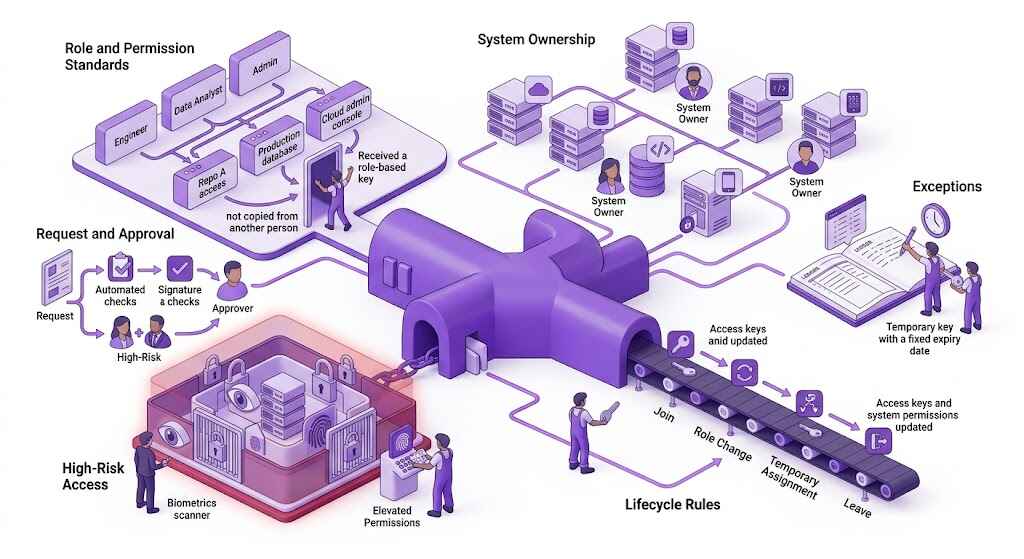
External access is not a one-time approval. It needs to be managed from the moment an account is requested until every related permission and credential has been removed.
Before Access Is Granted
Before an account is created, the request should record:
- External user and their employer or contracting relationship
- Internal sponsor responsible for the request
- Work they have been brought in to do
- Systems and data they need to reach
- Permissions being requested
- Start date and expected end date
- Outcome of the risk assessment and required controls
- People responsible for approving and reviewing the access
Where the system supports it, each person should receive their own account. A shared vendor account makes it difficult to connect activity to one individual and becomes harder to manage when the vendor changes staff.
While Access Is Active
Permissions should remain limited to the work that was approved. Depending on the risk involved, that may include:
- Least-privilege permissions
- Multi-factor authentication (MFA)
- Restrictions on production access
- Approved devices or connection methods
- Time-limited elevated permissions
- Activity records for sensitive systems
- Reviews based on the length and risk of the engagement
PureVPN for Teams can support remote vendor and contractor access through centralized user management, MFA, SSO, device posture checks, and user-level activity reporting. A dedicated IP or Team Server can also provide a consistent source IP for IP allowlists.
When the Work or Personnel Changes
A new project, change in responsibilities, contract extension, or replacement worker should trigger another access decision. The review should cover:
- Permissions that are no longer needed
- New permissions that require approval
- Whether the end date needs to change
- Whether the new work involves more sensitive systems or data
- Accounts belonging to vendor personnel who are no longer assigned to the engagement
A replacement worker should receive a separate account. The departing person’s account or credentials should not be transferred to someone else.
When the Engagement Ends
Offboarding should cover every account and credential tied to the work, not only the main user account. Depending on the engagement, that may include:
- Application and cloud accounts
- Repository permissions
- VPN access
- Privileged roles
- API keys and other credentials issued for the work
- Company-owned devices
- Shared files and resource ownership
- Shared credentials the contractor had access to
- Service accounts or integrations created during the project
The process should also record that removal was completed in the relevant systems. Closing the contract or marking an IT ticket as complete does not by itself confirm that every account, permission, and credential has been removed.
Who Is Responsible for Each Stage?
The exact job titles may differ, but each stage needs a clear owner. One team may trigger the action while another carries it out, especially when contracts, identities, and system permissions sit with different departments.
| Stage | Typical Owner or Team | Responsibility |
| Access request | Internal sponsor or project owner | Defines the work, systems involved, permissions needed, and expected end date |
| Risk review and approval | System owner, with security involvement where required | Reviews the requested scope and decides which controls and approvals apply |
| Account creation and changes | IT, identity team, or system administrator | Creates the account, applies the approved permissions, and records any expiry or review date |
| Periodic review | Internal sponsor and system owner | Confirms that the person is still assigned to the work and still needs the same permissions |
| Scope or personnel changes | Internal sponsor, procurement, or vendor management | Reports contract extensions, role changes, and vendor staff replacements to the teams managing access |
| Offboarding | IT and the relevant system owners | Removes accounts, roles, and credentials, then confirms removal in the affected systems |
Compliance or security governance may oversee the process by checking that approvals, reviews, exceptions, and removal records are available when needed.
Frequently Asked Questions
The system owner should approve it because they are responsible for the environment being accessed. Security may also need to review the request if it involves privileged actions, customer data, or other sensitive systems.
If the work has a known end date and the system supports expiry, yes. An extension should trigger a fresh review rather than leaving the account active without checking whether the same permissions are still needed.
The review schedule should reflect the level of access and the length of the engagement. Production and privileged access usually need closer review, while any change in role, scope, personnel, or contract status should trigger an immediate check.
Any replacement should always receive a new account and go through the required approval process. The previous worker’s account should be removed rather than transferred, reused, or shared.
Named accounts should be used wherever the system supports them. Shared accounts make it harder to trace activity and create problems when one person leaves or the vendor changes staff.