

Got questions? Let’s jump on a call
Feel free to reach out for any cyber security help you might need!
 4.5 out of 5
 4.7 out of 5
 One dashboard for provisioning, billing, and revoke
Manage employees, contractors, and approved vendors
Works with Dedicated IP, MFA, and SSO
One dashboard for provisioning, billing, and revoke
Manage employees, contractors, and approved vendors
Works with Dedicated IP, MFA, and SSO
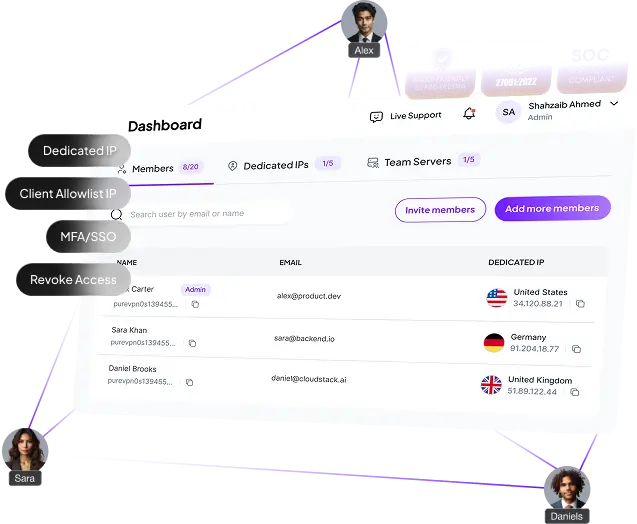



Access gets messy fast when remote employees , contractors and vendors are managed in different places.
A new employee, contractor, or vendor needs access today. But instead of one clean flow, access gets configured across multiple places.
The more third parties you work with, the easier it is to lose track of who has access, why they were added, and whether they still need it.
A project ends, a contractor rolls off, or a role changes — but access does not always get removed fast enough. That is where risk starts
When user management and billing live in different places, it becomes harder to understand who still needs access and what the team is actually paying for.
If your immediate need is cleaner provisioning, user control, and faster revoke, a months-long security rollout is not the right first move.
Every new contractor, vendor, consultant, or support request creates another allowlist request. Access gets delayed, or exceptions get made to keep work moving.
PureVPN for Teams gives you one dashboard to manage secure access for remote teams, contractors and vendors.
Add employees, contractors, consultants, and approved vendors from one dashboard instead of handling access across tickets, tools, and manual checklists.
When someone needs access, get them in quickly. When a role changes or a project ends, turn it off just as fast.
Keep billing, dedicated IP provisioning, and user management tied together so access stays operationally clean as the team grows.
Keep user management centralized while your team continues using the systems, workflows, and access controls already in place.
MFA and SSO protect your logins while Dedicated IP ensures controlled consistent access that your team or clients can allowlist.
Minimal setup required. One admin can get the team live quickly — no dedicated project, no long implementation


Keep access control centralized even when employees work across home, hotels, coworking spaces, and client sites.
Keep onboarding and offboarding clean when teams are growing, distributed, and moving fast.
Avoid scattered provisioning and reduce the risk of temporary access becoming permanent.
Support consultants, MSPs, and implementation teams working across multiple environments without creating admin chaos.
Add structure to access management before the problem becomes a larger security project.
Answer remote-access questions with a cleaner, more repeatable control model.
Read on to frequently asked questions about PureVPN teams


Yes. PureVPN for Teams gives you one dashboard to provision, manage, and revoke access across different user types.
Yes. Access can be removed centrally from the dashboard whenever a role changes or a project ends.
Yes. Billing and user management stay tied together in one place, which makes access easier to manage operationally.
Yes. You can manage users centrally and assign Dedicated IP where approved access is required.
Not for every company. It is the right fit when your immediate need is cleaner, faster access management without the overhead of a larger rollout.
Feel free to reach out for any cyber security help you might need!

