Invite
Add team members, vendors, or consultants and manage access from one dashboard.
 Dedicated IP your team or client can allowlist on protected tools
Centralized dashboard to manage VPN access + billing
Secure remote access deployed in minutes
Dedicated IP your team or client can allowlist on protected tools
Centralized dashboard to manage VPN access + billing
Secure remote access deployed in minutes
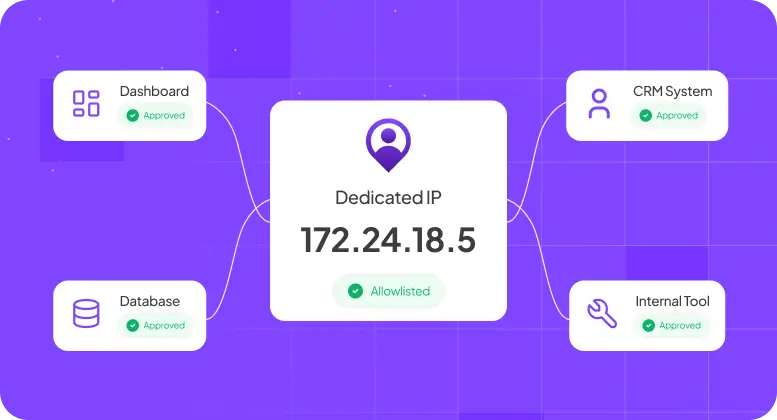






Your tools, client systems, and partner environments often expect access from a known IP. But your team no longer works from one office. Here’s what breaks.

When approved access is urgent, teams fall back to shared accounts, temporary workarounds, or broader access than they should have.
Every new contractor, vendor, consultant, or support request creates another allowlist request. Access gets delayed, or exceptions get made to keep work moving.

Your cloud consoles, admin panels, firewalls, and internal tools are often locked to approved IPs. But home networks, travel, and hybrid work mean the IP keeps changing.

If the real need is simply one trusted IP for controlled access, a long security rollout is not the right first move.

If you support multiple customers or environments, every client has different approved-access rules. You keep reconfiguring access instead of standardizing it.

Every new contractor, vendor, consultant, or support request creates another allowlist request. Access gets delayed, or exceptions get made to keep work moving.
PureVPN for Teams gives you a Dedicated IP you can use for predictable access across internal tools, partner systems, and client environments — without rebuilding your access architecture.
Give remote employees, contractors, and approved vendors a fixed IP your team or clients can allowlist — so access stays secure and predictable.
Provision users, manage billing, and revoke access fast from one dashboard.
Protect VPN logins with MFA and connect your existing SSO for cleaner, more controlled sign-ins.
Integrates with any cloud consoles, firewalls, admin panels, partner portals, and client systems that rely on approved IP access.
Minimal setup required. One admin can get the team live quickly — no dedicated project, no long implementation.


PureVPN for Teams supports access-control requirements commonly reviewed during enterprise security assessments and cyber insurance underwriting.
MFA, encryption, access visibility
access control, encrypted remote access, MFA
encrypted transmission and controlled remote access
secure access, encrypted transmission, and access controls
network security, identity and access management

“PureVPN sets an example of what customer support should be like. PureVPN has great features and an easy-to-navigate portal. It’s clear that a lot of thought was put into the UI, which I believe is an often undervalued feature of systems in general.”

CIO at HelloRache

“PureVPN sets an example of what customer support should be like. PureVPN has great features and an easy-to-navigate portal. It’s clear that a lot of thought was put into the UI, which I believe is an often undervalued feature of systems in general.”
CIO at HelloRache
“PureVPN sets an example of what customer support should be like. PureVPN has great features and an easy-to-navigate portal. It’s clear that a lot of thought was put into the UI, which I believe is an often undervalued feature of systems in general.”
CIO at HelloRache
“PureVPN sets an example of what customer support should be like. PureVPN has great features and an easy-to-navigate portal. It’s clear that a lot of thought was put into the UI, which I believe is an often undervalued feature of systems in general.”
CIO at HelloRache
“PureVPN sets an example of what customer support should be like. PureVPN has great features and an easy-to-navigate portal. It’s clear that a lot of thought was put into the UI, which I believe is an often undervalued feature of systems in general.”
CIO at HelloRache
Global dedicated IPs available—with on-demand custom locations
 New Zealand
 Netherland
 Singapore
 Canada
 Hong Kong
 Malta
Malta
 United States of America
 Germany
 Australia
New Zealand
Netherland
Singapore
Canada
Hong Kong
Malta
United States of America
Germany
Australia
New Zealand
Netherland
Singapore
Canada
Hong Kong
Malta
United States of America
Germany
Australia
New Zealand
Netherland
Singapore
Canada
Hong Kong
Malta
United States of America
Germany
Australia
United States of America
Germany
Australia
New Zealand
Netherland
Singapore
Canada
Hong Kong
Malta
United States of America
Germany
Australia
New Zealand
Netherland
Singapore
Canada
Hong Kong
Malta
United States of America
Germany
Australia
New Zealand
Netherland
Singapore
Canada
Hong Kong
Malta
United States of America
Germany
Australia
New Zealand
Netherland
Singapore
Canada
Hong Kong
Malta
Australia
New Zealand
Netherland
Singapore
Canada
Hong Kong
Malta
United States of America
Germany
Australia
New Zealand
Netherland
Singapore
Canada
Hong Kong
Malta
United States of America
Germany
Australia
New Zealand
Netherland
Singapore
Canada
Hong Kong
Malta
United States of America
Germany
Australia
United States of America
Germany
Australia
New Zealand
Netherland
Singapore
Canada
Hong Kong
Malta
United States of America
Germany
Australia
New Zealand
Netherland
Singapore
Canada
Hong Kong
Malta
United States of America
Germany
Australia
New Zealand
Netherland
Singapore
Canada
Hong Kong
Malta
United States of America
Germany
Australia
New Zealand
Netherland
Singapore
Canada
Hong Kong
Malta
Be it remote access, compliance, limit user access, PureVPN has been go-to solution for global leaders and their teams.
Read on to frequently asked questions about PureVPN teams


No. PureVPN provides the Dedicated IP. You or your client add that IP to the relevant allowlist.
Yes. Depending on your setup, you can assign a dedicated IP to an individual user or use one shared IP for a team or group.
Yes — as long as the client is able to allowlist the Dedicated IP on their systems.
No. This also works for employees, consultants, contractors, and support teams who need access from a fixed IP.
Not for every company. It is the right fit when your immediate need is predictable approved-IP access without the overhead of a full security rollout.