Invite
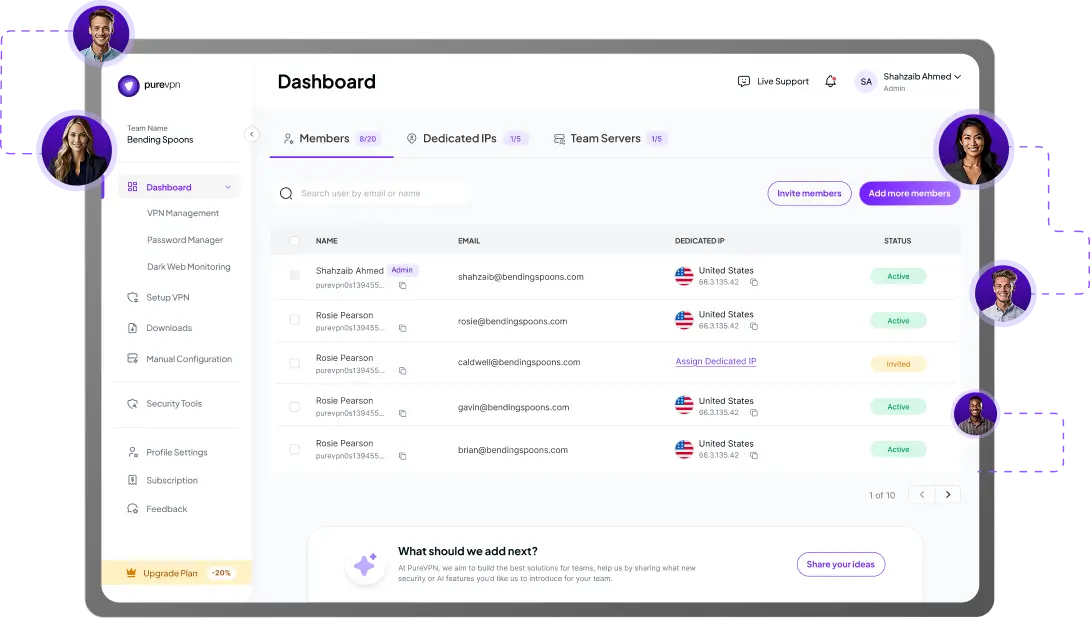
Add employees, contractors, or approved vendors from one dashboard.
 4.5 out of 5
 4.7 out of 5
 MFA, and SSO for secure log in + dedicated IP for controlled access
Secure remote access for employees, contractors, and approved vendors
One dashboard for provisioning, billing, and revoke
MFA, and SSO for secure log in + dedicated IP for controlled access
Secure remote access for employees, contractors, and approved vendors
One dashboard for provisioning, billing, and revoke



Controlling where access comes from matters. But controlling who signs in matters just as much. Here’s what breaks when login security is inconsistent.
One user signs in with the right controls. Another is added quickly without them. Over time, login security becomes uneven.
The more external users you work with, the harder it becomes to keep login control clean and consistent across accounts.

When roles change or contractors roll off, weak login discipline makes it harder to know what should be removed and when.
If login protection stops at a password, one reused credential or shared login can create unnecessary risk.

If your immediate need is stronger login control for team access, a larger identity or security transformation may not be the right first move.
The more hybrid and distributed your team becomes, the easier it is to lose track of who still has access — especially when contractors and vendors are involved too.
PureVPN for Teams helps you add cleaner login controls to team access now — without rebuilding your environment or taking on a heavyweight rollout.
MFA and SSO protect your logins while Dedicated IP ensures controlled consistent access that your team or clients can allowlist.
Add MFA on top of team access so users need more than just a password to sign in.
Connect your existing SSO to make login control cleaner and easier to manage across your team.
Get users in quickly with the right controls in place, then remove access just as fast when roles change.
Minimal setup required. One admin can add stronger login controls without turning access management into a long project.


Read on to frequently asked questions about PureVPN teams


MFA is there to add stronger login protection beyond just a password. How broadly you enforce it depends on your setup.
No. SSO centralizes sign-in. MFA adds another layer of login protection.
Yes. MFA and SSO protect the login. Dedicated IP controls the approved access path.
No. It also works for contractors, consultants, approved vendors, and other users who need controlled access.
Not for every company. It is the right fit when your immediate need is stronger login control as part of a cleaner access setup.